
Description
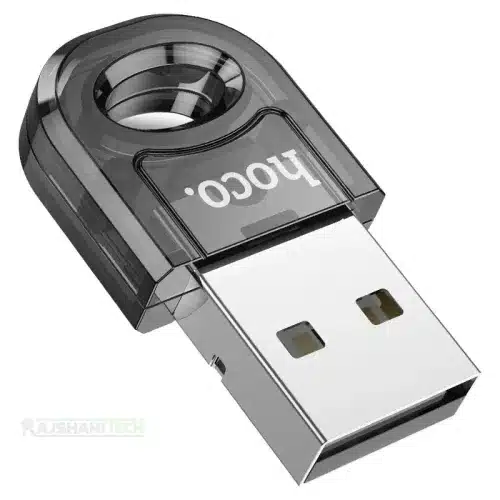
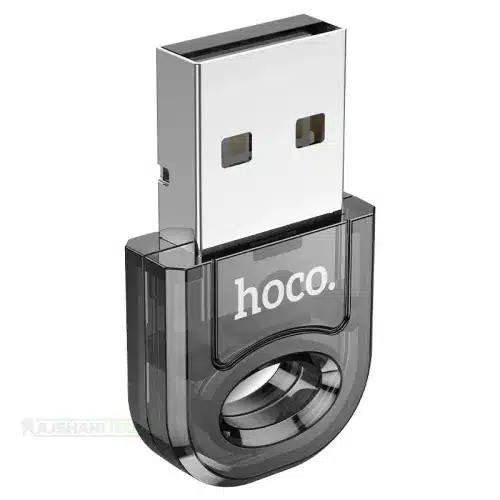
HOCO UA28 USB Bluetooth Adapter – Bluetooth 5.1 Wireless USB Dongle
Upgrade Your PC with Bluetooth 5.1 and Enjoy Convenient Wireless Connectivity
Bring wireless convenience to your desktop computer or laptop with the HOCO UA28 USB Bluetooth Adapter. Designed to add Bluetooth connectivity to compatible computers, this compact USB dongle allows you to connect wireless headphones, Bluetooth speakers, keyboards, mice, game controllers, and other compatible Bluetooth peripherals.
Featuring advanced Bluetooth 5.1 technology, backward compatibility with Bluetooth 4.0 and 3.0 devices, a transmission speed of up to 3Mbps, and a wireless transmission distance of up to 10 metres, the HOCO UA28 provides a convenient solution for everyday wireless connectivity.
Its ultra-compact design measures just 30 × 17 × 6mm and weighs approximately 2.7g, making it easy to carry and suitable for permanent use with compatible USB-A ports.
Whether you want to connect wireless earbuds to your desktop, use a Bluetooth keyboard and mouse, enjoy music through a wireless speaker, or connect other Bluetooth accessories, the HOCO UA28 USB Bluetooth Adapter makes upgrading your computer’s connectivity easier.
If you are looking for a compact and practical Bluetooth USB adapter in Bangladesh, explore the HOCO UA28 at Rajshahi Tech.
HOCO UA28 USB Bluetooth Adapter – Full Product Review
1. Compact and Portable USB Design
The HOCO UA28 features a small and lightweight design that makes it convenient for everyday computer use.
Measuring approximately 30 × 17 × 6mm and weighing only 2.7g, this USB Bluetooth adapter takes up very little space when connected to your computer.
Its compact construction makes it suitable for:
- Desktop computers.
- Laptop computers.
- Home office setups.
- Professional workstations.
- Everyday computer accessories.
You can leave the adapter connected to a compatible USB port without dealing with a large external Bluetooth receiver.
Its portable construction also makes it convenient to carry between different computers.
2. Advanced Bluetooth 5.1 Technology
One of the main features of the HOCO UA28 is its Bluetooth 5.1 wireless connectivity.
Bluetooth 5.1 provides modern wireless communication technology for connecting compatible Bluetooth peripherals to your computer.
It is designed to offer efficient connectivity and convenient wireless communication.
You can use the adapter to connect compatible devices such as:
- Bluetooth headphones.
- Wireless earbuds.
- Bluetooth speakers.
- Wireless keyboards.
- Wireless mice.
- Compatible game controllers.
- Other Bluetooth peripherals.
The adapter provides a practical way to add Bluetooth functionality to computers that do not have built-in Bluetooth support.
3. Backward Compatibility with Older Bluetooth Devices
The HOCO UA28 supports Bluetooth 5.1 and backward compatibility with Bluetooth 4.0 and 3.0 devices.
This makes it useful for people who already own older Bluetooth accessories and want to connect them to a compatible computer.
You do not necessarily need to replace your existing wireless peripherals simply because they use an older Bluetooth version.
The adapter is designed to support compatible devices across different Bluetooth generations.
Actual connectivity depends on the Bluetooth profiles and features supported by both devices.
4. Up to 10 Metres Wireless Transmission Distance
The HOCO UA28 offers an advertised wireless transmission distance of up to 10 metres under suitable conditions.
This allows you to use compatible Bluetooth peripherals without remaining directly beside your computer.
For example, you can:
- Listen to music through Bluetooth headphones.
- Use a wireless keyboard from your desk.
- Control your computer with a Bluetooth mouse.
- Connect a Bluetooth speaker.
- Use compatible wireless accessories around your workspace.
Actual wireless range depends on obstacles, interference, USB port placement, and the connected Bluetooth device.
5. Transmission Speed Up to 3Mbps
The HOCO UA28 supports a transmission speed of up to 3Mbps.
This provides wireless data communication for supported Bluetooth peripherals.
It is useful for everyday Bluetooth connectivity, including connecting compatible accessories and transferring supported data between devices.
Please note that the advertised 3Mbps figure is a Bluetooth transmission specification, not a guarantee of actual file-transfer speed. Real-world performance depends on the Bluetooth protocol, connected devices, and environmental conditions.
6. Connect Multiple Bluetooth Devices
The HOCO UA28 is designed to support connections with multiple compatible Bluetooth peripherals.
This makes it useful for users who want to build a wireless computer setup without depending on separate wired accessories.
For example, you may want to connect:
- A Bluetooth keyboard.
- A Bluetooth mouse.
- Wireless headphones.
- A Bluetooth speaker.
- Other compatible peripherals.
The number of devices that can remain connected simultaneously depends on the adapter’s implementation, computer operating system, Bluetooth profiles, and device requirements.
7. Convenient Wireless Audio Connectivity
If your desktop computer or laptop does not have Bluetooth, the HOCO UA28 can help add wireless audio connectivity.
After successful installation and pairing, you can connect compatible Bluetooth headphones, earbuds, and speakers.
This makes it convenient for:
- Listening to music.
- Watching movies.
- Watching online videos.
- Attending online meetings.
- Enjoying everyday entertainment.
Audio quality and latency depend on the connected audio device, Bluetooth audio profiles, and computer software.
8. Connect Wireless Keyboard and Mouse
The HOCO UA28 is also useful for people who want a cleaner and more organized computer workspace.
You can connect compatible Bluetooth keyboards and mice without using traditional wired connections.
This can help reduce cable clutter around your desk and provide more flexibility when arranging your workspace.
It is suitable for home offices, educational environments, and everyday desktop computer setups.
9. Convenient USB-A Connection
The HOCO UA28 uses a USB-A interface, making it suitable for computers with compatible USB-A ports.
Simply connect the adapter to an available USB-A port and configure Bluetooth through your computer’s operating system.
Some compatible systems may recognize the adapter automatically, while others may require driver installation or additional configuration.
For best results, check your computer’s operating system and driver compatibility before use.
10. Durable Plastic Construction
The HOCO UA28 features a plastic exterior designed for lightweight everyday use.
Its compact construction helps protect the internal Bluetooth components during normal handling.
The small design also makes it convenient to keep connected to a desktop or laptop without taking up much space.
11. Ideal for Desktop Computers Without Built-In Bluetooth
Many desktop computers do not include integrated Bluetooth functionality.
The HOCO UA28 provides a convenient way to add wireless connectivity without purchasing a separate Bluetooth expansion card.
It is particularly useful for:
- Older desktop computers.
- Custom-built PCs.
- Office computers.
- Computers without built-in Bluetooth.
- Compatible laptops requiring an additional Bluetooth adapter.
It provides a simple alternative to installing internal Bluetooth hardware.
12. Practical Wireless Upgrade for Everyday Users
The HOCO UA28 combines Bluetooth 5.1 technology, backward compatibility, compact construction, and convenient USB connectivity.
It is designed for users who want to connect their favourite wireless peripherals to compatible computers.
Whether you are creating a wireless office setup, connecting headphones, or adding Bluetooth support to an older desktop, the HOCO UA28 offers a practical connectivity solution.
HOCO UA28 USB Bluetooth Adapter – Key Features
- Advanced Bluetooth 5.1 technology.
- USB-A interface.
- Backward compatibility with Bluetooth 4.0 and 3.0.
- Up to 3Mbps advertised transmission speed.
- Up to 10 metres advertised wireless transmission distance.
- Supports compatible Bluetooth peripherals.
- Multiple Bluetooth device connection support.
- Suitable for Bluetooth headphones and earbuds.
- Compatible with Bluetooth speakers.
- Supports compatible wireless keyboards and mice.
- Compact and portable construction.
- Lightweight 2.7g design.
- Durable plastic material.
- Convenient wireless connectivity for desktop computers and laptops.
- Designed for computers without built-in Bluetooth.
Full Technical Specifications of HOCO UA28 USB Bluetooth Adapter
| Specification | Details |
|---|---|
| Brand | HOCO |
| Model | UA28 |
| Product Name | HOCO UA28 USB Bluetooth Adapter |
| Product Type | USB Bluetooth Adapter |
| Adapter Category | Wireless Bluetooth Dongle |
| Interface | USB-A |
| Bluetooth Version | 5.1 |
| Backward Compatibility | Bluetooth 4.0 and 3.0 |
| Bluetooth Mode | Dual Mode |
| Working Frequency | 2.4GHz |
| Transmission Speed | Up to 3Mbps |
| Transmission Distance | Up to 10 Metres |
| Device Connectivity | Multiple Bluetooth Peripherals |
| Material | Plastic |
| Colour | Transparent Black |
| Dimensions | 30 × 17 × 6mm |
| Weight | Approximately 2.7g |
| Audio Connectivity | Supported with Compatible Devices |
| Keyboard Connectivity | Supported |
| Mouse Connectivity | Supported |
| Speaker Connectivity | Supported |
| Headphone Connectivity | Supported |
| Controller Connectivity | Compatible Bluetooth Controllers |
| Main Usage | Adding Bluetooth Connectivity to Computers |
Specification Note: The specifications above are based primarily on HOCO’s product information. Operating system support and simultaneous device capacity can vary by computer, driver, and connected peripherals. The advertised 10-metre range is subject to environmental conditions.
Supported Devices and Applications
The HOCO UA28 can be used with different types of compatible Bluetooth accessories.
Bluetooth Headphones and Earbuds
Connect compatible wireless headphones and earbuds to your desktop or laptop for convenient audio playback.
Bluetooth Speakers
Pair a compatible wireless speaker with your computer and enjoy music, videos, and other audio content.
Wireless Keyboards
Connect a compatible Bluetooth keyboard for a cleaner and more flexible workspace.
Wireless Mice
Use a compatible Bluetooth mouse without requiring a traditional wired mouse connection.
Bluetooth Game Controllers
Connect supported Bluetooth game controllers to compatible computers for casual gaming and entertainment.
Other Bluetooth Peripherals
The adapter is designed for compatible Bluetooth accessories and peripherals that use supported Bluetooth profiles.
Device compatibility should always be checked before purchasing.
HOCO UA28 Supported Operating Systems
The HOCO UA28 is listed by retailers for use with several computer operating systems.
| Operating System | Compatibility Information |
|---|---|
| Windows 7 | Listed by some retailers |
| Windows 8 | Listed by some retailers |
| Windows 10 | Listed by some retailers |
| Windows 11 | Verify driver support |
| Linux | Supported by some configurations |
| macOS | Not officially confirmed |
Important: Operating system compatibility is dependent on the required Bluetooth chipset driver and operating system support. The adapter should not be assumed to work automatically with every operating system.
How to Use the HOCO UA28 USB Bluetooth Adapter
Setting up the HOCO UA28 is straightforward on a compatible computer.
Step 1: Connect the Adapter
Insert the HOCO UA28 into an available USB-A port on your desktop computer or laptop.
Step 2: Allow Device Recognition
Wait for your operating system to detect the adapter.
Some computers may recognize it automatically, while others may require a compatible driver.
Step 3: Enable Bluetooth
Open your computer’s Bluetooth settings and make sure Bluetooth functionality is enabled.
Step 4: Put Your Bluetooth Device in Pairing Mode
Turn on your Bluetooth headphones, speaker, keyboard, mouse, or other compatible accessory and activate its pairing mode.
Step 5: Search for Available Devices
Use your computer’s Bluetooth settings to search for nearby Bluetooth peripherals.
Step 6: Complete Pairing
Select the desired Bluetooth device and follow the operating system’s pairing instructions.
Step 7: Enjoy Wireless Connectivity
Once successfully paired, you can start using your compatible Bluetooth accessory.
Why Should You Choose HOCO UA28 USB Bluetooth Adapter?
Here are some reasons to consider the HOCO UA28:
1. Modern Bluetooth Technology: Bluetooth 5.1 provides convenient wireless connectivity for compatible devices.
2. Compact Design: Its 30 × 17 × 6mm dimensions make it easy to carry and use.
3. Lightweight Construction: At approximately 2.7g, it adds very little weight to your computer accessories.
4. Backward Compatibility: Support for Bluetooth 4.0 and 3.0 makes it useful for older compatible peripherals.
5. Wireless Audio: Connect Bluetooth headphones, earbuds, and speakers to compatible computers.
6. Better Workspace Organization: Use compatible Bluetooth keyboards and mice to reduce cable clutter.
7. Convenient Range: Its advertised 10-metre wireless transmission distance offers flexibility for everyday use.
8. Easy USB Connection: The USB-A interface provides a convenient way to add Bluetooth functionality to compatible computers.
HOCO UA28 vs Computers Without Built-In Bluetooth
The HOCO UA28 is particularly useful for desktop computers that do not include integrated Bluetooth hardware.
| Feature | Without Bluetooth Adapter | With HOCO UA28 |
|---|---|---|
| Bluetooth Connectivity | Not Available | Added Through USB |
| Wireless Headphones | Not Directly Supported | Supported with Compatible Devices |
| Bluetooth Speakers | Not Directly Supported | Supported |
| Bluetooth Keyboard | Not Directly Supported | Supported |
| Bluetooth Mouse | Not Directly Supported | Supported |
| Bluetooth Peripherals | Limited by Existing Hardware | Expanded Connectivity |
| USB Connection | Not Required | USB-A Required |
The HOCO UA28 provides a convenient way to upgrade compatible computers without installing an internal Bluetooth card.
Who Should Buy HOCO UA28 USB Bluetooth Adapter?
The HOCO UA28 is suitable for:
- Desktop computer users without built-in Bluetooth.
- Laptop users who need additional Bluetooth connectivity.
- Students who want to connect wireless accessories.
- Office professionals creating wireless workspaces.
- Music lovers who use Bluetooth headphones.
- Users who want to connect wireless speakers.
- People who prefer Bluetooth keyboards and mice.
- Computer users who want a compact wireless connectivity solution.
- Users with older Bluetooth 4.0 and 3.0 accessories.
HOCO UA28 USB Bluetooth Adapter in Bangladesh
Looking for the HOCO UA28 USB Bluetooth Adapter in Bangladesh?
Rajshahi Tech provides a convenient online destination for exploring computer accessories, technology gadgets, and useful connectivity solutions.
The HOCO UA28 is designed to add Bluetooth functionality to compatible computers through a USB-A connection.
With Bluetooth 5.1 technology, backward compatibility with Bluetooth 4.0 and 3.0, up to 3Mbps transmission speed, and an advertised 10-metre wireless range, it offers practical wireless connectivity for everyday computer users.
Whether you want to connect wireless headphones, Bluetooth speakers, keyboards, mice, or other compatible peripherals, the HOCO UA28 is a useful computer accessory.
Explore the HOCO UA28 USB Bluetooth Adapter at Rajshahi Tech and make your compatible desktop or laptop more convenient for wireless connectivity.
Frequently Asked Questions (FAQs) About HOCO UA28 USB Bluetooth Adapter
1. What is the HOCO UA28 USB Bluetooth Adapter?
The HOCO UA28 is a compact USB-A Bluetooth adapter designed to add wireless Bluetooth connectivity to compatible desktop computers and laptops. It uses Bluetooth 5.1 technology and supports compatible Bluetooth peripherals.
2. Which Bluetooth version does the HOCO UA28 support?
The HOCO UA28 supports Bluetooth 5.1 technology and backward compatibility with Bluetooth 4.0 and 3.0 devices.
3. What is the maximum transmission distance of the HOCO UA28?
The HOCO UA28 has an advertised wireless transmission distance of up to 10 metres under suitable conditions. Actual range depends on obstacles, interference, and connected devices.
4. Can I connect Bluetooth headphones to the HOCO UA28?
Yes. You can connect compatible Bluetooth headphones and wireless earbuds to a computer using the HOCO UA28 after successful installation and pairing.
5. Does the HOCO UA28 support Bluetooth speakers, keyboards, and mice?
Yes. The adapter is designed to connect compatible Bluetooth speakers, keyboards, mice, and other wireless peripherals to compatible computers.
6. Can the HOCO UA28 connect multiple Bluetooth devices simultaneously?
The HOCO UA28 is advertised as supporting multiple Bluetooth device connections. However, the actual number of simultaneously connected devices depends on the computer, operating system, drivers, and Bluetooth profiles.
7. Is the HOCO UA28 compatible with Windows 10 and Windows 11?
Windows 10 is listed by retailers among the supported operating systems. Windows 11 compatibility should be verified against the available driver and hardware configuration before purchasing.
8. Does the HOCO UA28 require driver installation?
Some compatible computers may recognize the adapter automatically, while others may require a Bluetooth driver. Installation requirements depend on your operating system and existing Bluetooth configuration.
Frequently Asked Questions About Rajshahi Tech
9. What is Rajshahi Tech?
Rajshahi Tech is an online technology shopping website where customers can explore computer accessories, electronic products, smart gadgets, mobile accessories, and modern technology solutions.
10. Why should I buy computer accessories from Rajshahi Tech?
Rajshahi Tech aims to provide a convenient online shopping experience with detailed product descriptions, technical specifications, and useful information to help customers make informed purchasing decisions.
11. Does Rajshahi Tech provide home delivery across Bangladesh?
Delivery availability depends on the store’s current shipping policy and courier coverage. Customers can check the delivery information on the official website or contact Rajshahi Tech for confirmation.
12. How can I contact Rajshahi Tech for product information and customer support?
Customers can contact Rajshahi Tech through the contact information and communication channels available on its official website for product inquiries, order assistance, and other shopping-related support.
Hoco UA28 USB Bluetooth Adapter is now available at Rajshahi Tech at the best price.100% authentic product with replacement guarantee available.
You may join our official Facebook Group to know more about us and stay connected.






































There are no reviews yet.