
Description
Redmi Smart Pen – Full Review, Specifications, Features and FAQs
The Redmi Smart Pen is an advanced active stylus designed to provide a smooth, precise and natural writing and drawing experience on compatible Redmi and Xiaomi tablets. With 4096 levels of pressure sensitivity, 240Hz touch sampling, millisecond-level ultra-low latency, 10g activation force and up to 12 hours of continuous writing, the Redmi Smart Pen is suitable for students, professionals, digital artists, note-takers and everyday tablet users.
At Rajshahi Tech, we present the Redmi Smart Pen as an ideal companion for compatible Redmi tablets, especially for users who want to take handwritten notes, draw, annotate documents, capture screenshots and navigate documents more efficiently.

Redmi Smart Pen Highlights
- 4096-level pressure sensitivity
- 240Hz touch sampling rate
- Millisecond-level ultra-low latency
- 10g activation force
- Up to 12 hours of continuous writing
- Bluetooth 5.1 connectivity
- Dedicated writing and screenshot buttons
- Ergonomic grip for comfortable use
- Screen-off writing support on compatible devices
- Shortcut functions for writing, screenshots and document navigation
- Support for compatible drawing and note-taking applications
- Lightweight 12.7 ± 1g design
- 157mm pen length
Redmi Smart Pen Full Review
Design and Build Quality
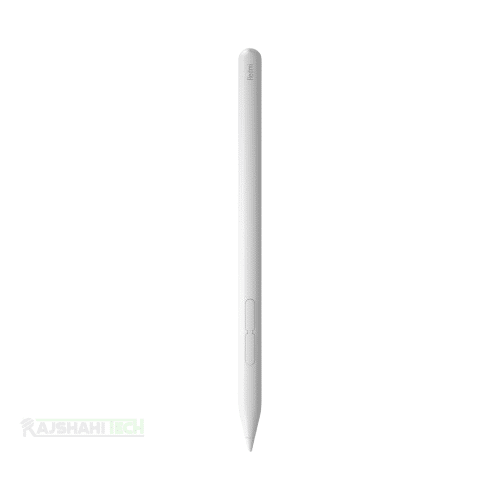
The Redmi Smart Pen features a clean white design with an ergonomic grip that is intended to feel comfortable during extended writing and drawing sessions. Its 157mm length and approximately 12.7g weight make it lightweight enough for everyday use.
The pen uses a twist-to-open tip design and is built around a simple, minimalist form factor. Its lightweight construction makes it suitable for students taking long notes as well as users working on illustrations or annotations.
Writing Experience
Writing performance is one of the main strengths of the Redmi Smart Pen. Xiaomi specifies 4096 levels of pressure sensitivity, allowing the pen to detect different levels of pressure and translate them into variations in digital strokes.
The pen also supports a 10g activation force, allowing the screen to respond to relatively light touches. Xiaomi states that its millisecond-level ultra-low-latency system can provide a more natural writing experience, although actual latency can vary depending on the compatible tablet, application and software version.
For handwriting, note-taking and annotations, the combination of pressure sensitivity and low latency helps make the experience feel more responsive than using a conventional capacitive stylus.
240Hz Touch Sampling Rate
The Redmi Smart Pen supports a 240Hz touch sampling rate. Xiaomi also describes a dual optimization system involving the pen and screen, along with a proprietary point-prediction algorithm designed to improve responsiveness.
On compatible devices and supported applications, the writing experience can therefore feel smoother and more responsive during fast handwriting, sketching and drawing. Actual performance may vary according to the tablet and software being used.
Dual Shortcut Buttons
The Redmi Smart Pen includes two dedicated buttons:
- Writing button
- Screenshot button
The buttons can provide convenient shortcuts for supported functions. Xiaomi states that holding the writing button and touching the display can open Mi Canvas, while the writing button can be used for brush switching within Mi Canvas.
Similarly, holding the screenshot button and touching the display can provide a quick screenshot function. Within Mi Canvas, the screenshot button can also be used for switching colours. Button functionality may vary depending on the application and software version.
Screen-Off Writing
One useful feature of the Redmi Smart Pen is its screen-off writing capability on supported devices. Xiaomi states that users can tap the display with the pen tip while the screen is off to activate the display and access a full-screen canvas.
This feature needs to be enabled manually in settings and may depend on device compatibility.
Battery Life
The Redmi Smart Pen is designed for extended writing sessions and offers up to 12 hours of continuous writing according to Xiaomi’s specifications.
Battery performance can vary depending on usage, connected device, software and other conditions. For students, office users and digital artists, the advertised battery life provides enough capacity for extended note-taking and creative sessions.
Bluetooth 5.1 Connectivity
The Redmi Smart Pen uses Bluetooth 5.1 for connectivity. Pairing with a compatible tablet enables the pen’s smart functions and shortcut controls.
Because compatibility depends on the tablet model and software, users should confirm that their specific Redmi or Xiaomi tablet supports the Redmi Smart Pen before purchasing. Xiaomi’s regional specifications pages list compatible models, which can differ between markets.
Drawing and Creative Work
With 4096-level pressure sensitivity and low-latency input, the Redmi Smart Pen can be useful for digital drawing, sketching, illustration and creative applications.
Xiaomi also highlights support for compatible third-party drawing applications, one-stroke drawing functionality and text recognition. However, individual features can depend on the application and device software.
Note-Taking and Productivity
The Redmi Smart Pen is particularly useful for students and professionals who regularly work with digital documents.
You can use a compatible tablet and pen for:
- Handwritten notes
- PDF annotation
- Document marking
- Digital signatures where supported
- Sketching ideas
- Drawing diagrams
- Reading and navigating documents
- Digital artwork
- Classroom notes
- Office presentations
- Screenshot capture
The shortcut buttons can also make document navigation more convenient on supported software.
Redmi Smart Pen Full Specifications
| Specification | Details |
|---|---|
| Product Name | Redmi Smart Pen |
| Product Type | Active Stylus Pen |
| Brand | Redmi |
| Pen Length | 157 mm |
| Weight | 12.7 ± 1 g |
| Pressure Sensitivity | 4096 levels |
| Touch Sampling Rate | 240Hz |
| Activation Force | 10g |
| Connectivity | Bluetooth 5.1 |
| Buttons | 2 |
| Button Functions | Writing button and Screenshot button |
| Continuous Writing | Up to 12 hours |
| Design | Ergonomic grip |
| Colour | White |
| Compatible Devices | Compatible Redmi/Xiaomi tablet models |
| Package Contents | Redmi Smart Pen, Pen Tip, Quick Start Guide, Warranty Card |
The core specifications above are based on Xiaomi’s official specification pages. Package contents may vary by region.
Redmi Smart Pen Compatible Devices
Compatibility can vary by region and software version. Xiaomi’s current regional specification pages list models including:
- Redmi Pad Pro series
- Redmi Pad 2 series
- Redmi Pad 2 Pro series
- Xiaomi Pad Mini
Some regional pages list a narrower compatibility range, so customers should verify their exact tablet model before purchase.
What Can You Do With Redmi Smart Pen?
The Redmi Smart Pen is more than a basic stylus. On compatible devices and applications, it can be used for:
- Writing handwritten notes
- Drawing and sketching
- Digital artwork
- Annotating documents
- Reading and marking PDFs
- Taking screenshots
- Navigating pages and documents
- Switching brushes in supported applications
- Switching colours in Mi Canvas
- Text recognition
- Quick access to supported canvas functions
Redmi Smart Pen Pros and Cons
Pros
- 4096-level pressure sensitivity
- Responsive writing experience
- 240Hz touch sampling
- 10g activation force
- Up to 12 hours of continuous writing
- Lightweight design
- Two useful shortcut buttons
- Bluetooth 5.1 connectivity
- Useful for students, artists and professionals
- Supports screen-off writing on compatible devices
Cons
- Compatibility is limited to supported tablet models
- Some shortcut functions depend on supported applications
- Features may vary between tablet models and software versions
- Performance can vary depending on the application and device
Who Should Buy the Redmi Smart Pen?
The Redmi Smart Pen is a good choice for users who already own a compatible Redmi or Xiaomi tablet and want a dedicated stylus for writing, drawing and productivity.
It is especially suitable for:
- Students who take digital handwritten notes
- Teachers and educators
- Digital artists and illustrators
- Office professionals
- Designers
- People who annotate PDFs and documents
- Tablet users who prefer handwriting over typing
- Users who want a lightweight stylus for everyday creative work
Redmi Smart Pen vs Normal Capacitive Stylus
A normal capacitive stylus generally behaves like a finger on a touchscreen and does not offer the same level of pressure sensitivity or smart shortcut functionality.
The Redmi Smart Pen is an active stylus with 4096 levels of pressure sensitivity, Bluetooth 5.1 connectivity, 240Hz touch sampling and dedicated buttons. This makes it considerably more suitable for handwriting, drawing, annotation and productivity on compatible tablets.
Final Verdict
The Redmi Smart Pen is a capable and lightweight active stylus for compatible Redmi and Xiaomi tablets. Its 4096-level pressure sensitivity, 240Hz touch sampling, low-latency response, 10g activation force and up to 12 hours of continuous writing make it a strong option for digital note-taking, drawing and everyday tablet productivity.
The two shortcut buttons add extra convenience, while features such as screen-off writing and application-specific controls make the pen more versatile. However, buyers should always verify tablet compatibility because available features can vary by model, application and software version.
For students, professionals, artists and Redmi tablet users looking for a more natural digital writing experience, the Redmi Smart Pen is a practical accessory worth considering.
Redmi Smart Pen FAQs
1. What is the Redmi Smart Pen?
The Redmi Smart Pen is an active digital stylus designed for compatible Redmi and Xiaomi tablets. It supports pressure-sensitive writing, drawing and various shortcut functions.
2. How many pressure sensitivity levels does Redmi Smart Pen have?
The Redmi Smart Pen supports 4096 levels of pressure sensitivity.
3. What is the touch sampling rate of Redmi Smart Pen?
The Redmi Smart Pen supports a 240Hz touch sampling rate.
4. What is the activation force of Redmi Smart Pen?
The Redmi Smart Pen has a 10g activation force under Xiaomi’s specified testing conditions.
5. How long does Redmi Smart Pen last on a charge?
The Redmi Smart Pen supports up to 12 hours of continuous writing, according to Xiaomi’s published specifications. Actual battery life can vary depending on usage and other conditions.
6. Does Redmi Smart Pen support Bluetooth?
Yes. The Redmi Smart Pen uses Bluetooth 5.1 for connectivity.
7. How many buttons does Redmi Smart Pen have?
The pen has two buttons: a writing button and a screenshot button.
8. Can Redmi Smart Pen take screenshots?
Yes, the screenshot button can be used for quick screenshot functionality on supported devices and software.
9. Can Redmi Smart Pen be used for drawing?
Yes. Its 4096-level pressure sensitivity and responsive input make it suitable for drawing, sketching and compatible creative applications.
10. Can Redmi Smart Pen be used for taking notes?
Yes. Handwritten note-taking is one of the main uses of the Redmi Smart Pen.
Redmi Smart Pen is now available at Rajshahi Tech at the best price.100% authentic product with replacement guarantee available.
You may join our official Facebook Group to know more about us and stay connected.












































There are no reviews yet.